The October 14 menu shows Snitch at 3 kills, Homies at 5, Bomber at 7 and Drive By at 9, with three selected slots. Patch 1.0.1.8 subsequently renamed Bomber to Crashout and changed Homies and Drive-by. Use the table to compare your options, then verify requirements in your installed game: the recording does not identify its build, and the patch does not republish the kill costs.
Compare the four recorded options
| Option | Kills shown on October 14 | What the evidence establishes | What to recheck after updating |
|---|---|---|---|
| Snitch | 3 | Its menu description reveals enemies on your team's minimap | Current availability and whether a team Snitch is already active |
| Homies | 5 | The video shows AI allies joining combat | Behavior around ceilings and team colors in Chaos were fixed in 1.0.1.8 |
| Crashout, previously Bomber | 7 under the old name | The original menu calls it Suicide Bomber; the developer later announces the rename | Find Crashout in the updated selection; a rename alone does not prove changed damage or cost |
| Drive By | 9 | The video shows it as the fourth choice, separate from the three selected slots | Starting health was increased in 1.0.1.8, without a published value |
Source: BAMS 2's menu at 7:53, published October 14, and the official October 17 patch. These are observed requirements and announced changes, not a measured ranking of damage, duration or reliability. The four entries are also searchable under Killstreaks in the game database.
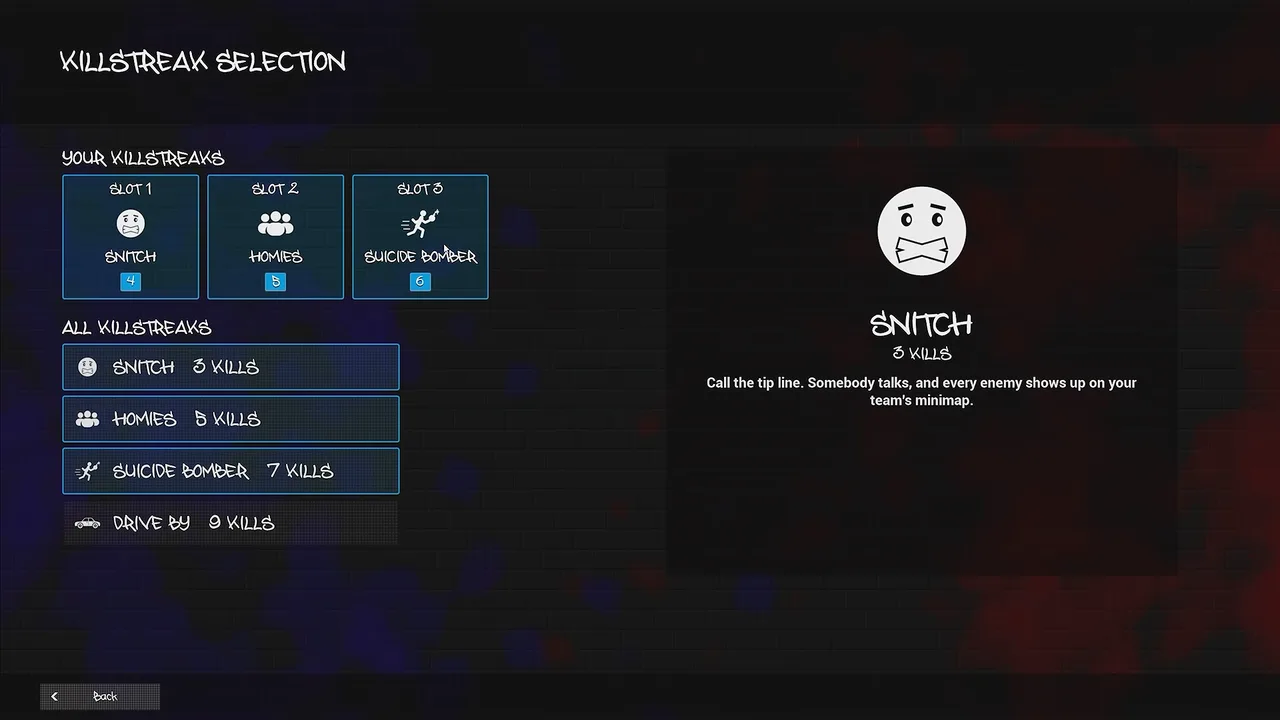
The screenshot separates two numbers that are easy to confuse: the 3 / 5 / 7 / 9 kills beside the available options and the 4 / 5 / 6 keyboard bindings beneath the three selected slots. A blue 4 under Snitch does not mean Snitch costs four kills.
Plan three slots around the match you will play
The recorded setup selects Snitch, Homies and Bomber. Treat that as one player's configuration, not a tested best combination. Replacing one of those choices with Drive By changes the target shown in the historical menu; it does not establish that the replacement will be more productive in your matches.
Use the loadout planner to keep the selection with your gun, attachments, passive and mode:
- Open your current in-game killstreak selection and read the available options and requirements.
- Start a saved loadout or edit one of your existing setups. Put your selected three streaks in Equipment or Match notes, using the current names.
- Record the mode, game version and the slot order you actually use. Keep weapon setup and mode constant when comparing a different streak selection.
- After a session, record which choices you earned and used. An unused expensive option and a frequently available lower-cost option answer different needs; a match score alone does not explain the difference.
- Compare two saved configurations and export your notes before clearing browser storage or moving devices.
Those steps organize your own observations. They do not synchronize with Steam, choose streaks in game, or predict how many kills you will earn. The mode comparison helps keep the objective in view: a call-in does not replace collecting chains, taking territory or completing a bomb round.
Call in the selected slot
In the inspected keyboard setup, 4 calls slot 1, 5 calls slot 2 and 6 calls slot 3. Those bindings belong to slots, so confirm the selected icon before pressing a key after rearranging your setup. Use the keys shown by your own controls menu if you have rebound them.
At 12:25 in BAMS 2’s recording, the creator reads a message that the team’s Snitch is already active after an unsuccessful call. That is a useful check when pressing the bound key appears to do nothing: read the on-screen message before assuming the key is broken. The recording does not establish the rules for stacking every other streak, so do not extend that behavior to Homies or Drive By without checking.
For input configuration, use the controls guide or controller guide. The keyboard screenshot does not establish controller defaults.
Review a saved setup after 1.0.1.8
The loadout planner shows the official update alongside saved entries. Drive By, Drive-by, Homies, Bomber and Crashout in your saved fields can surface their corresponding patch notes. Every saved weapon setup also receives the extra starting-ammunition reminder. Marking a note reviewed records your review in this browser; it does not certify the configuration in game.
For a Bomber setup, rename the choice to Crashout after checking the updated menu. For Drive By, recheck its behavior rather than inventing a new health total. For Homies, the announced fixes concern ceiling clipping and Chaos colors; they do not establish a damage increase or a new required kill count. Editing the saved setup resets its reviewed marker so you can revisit the notes.
The patch timeline summarizes the official changes and dates. No independently verified current duration, health, damage, streak-reset rule or complete stacking table is available in the inspected material. Keep those fields out of numerical comparisons until they can be checked.