
Hood Warfare 2 supports matches against bots. You can choose a map, mode and match settings, then add bots to fill the teams. That makes a bot match a useful place to learn an objective or check your inputs before joining other players. Bot difficulty options, exact menu labels and whether bot matches count toward unlocks are not verified here.
Build the match around one goal
Use the match setup available in your installed game. The confirmed setup choices are the map, mode, match settings and bots; a particular button sequence is not established.
- Choose the map you want to recognize. Keep it fixed while practicing the same task.
- Choose the mode whose objective you want to learn.
- Review the match settings shown before starting. Record any setting that could affect your comparison.
- Add bots to fill the teams using the available match setup controls.
- Start the match and check that the chosen map and mode are the ones you intended.
Start with a practical goal such as recognizing the objective information shown during the match or finding a repeatable aiming reference. Trying to learn the entire game in one session makes it harder to notice what actually changed between attempts.
Choose what to practice
| Practice goal | What to focus on |
|---|---|
| Understand an objective | Watch the objective information and observe which actions move the score |
| Check controls | Repeat an action and compare the result with the binding or prompt currently shown |
| Learn a map | Recognize landmarks and revisit a route without assuming a published map layout |
| Compare a setup | Keep the map, mode and other available settings fixed while changing one loadout choice |
These are suggested practice uses. They do not establish bot behavior, difficulty scaling or a training mode separate from ordinary match setup.
Bots and private lobbies are separate features
Patch 1.0.1.4, announced October 14, added private password-only lobbies with friends. That announcement does not establish that every private lobby uses bots or that all bot sessions award progression. Use the private-match guide when the goal is controlling who joins.
For a friends-only practice test, update first and check the options your lobby actually offers. Keep map, mode and setup fixed before comparing inputs or attachments. If a teammate joins but communication fails, test the T push-to-talk default with the intended chat audience.
The later patch also addressed joining issues and false anti-cheat kicks. Follow the dated update notes when an older setup stops working; do not assume bot rules changed without an explicit note.
Source: Trapstar Games: patch 1.0.1.4.
Practice bots and Homies are different uses of AI
A configured bot match is a practice setup. Homies appears in the recorded killstreak menu as a separate reward, alongside Snitch and the other streaks. Do not assume that changing practice bots changes the allies called by that reward.
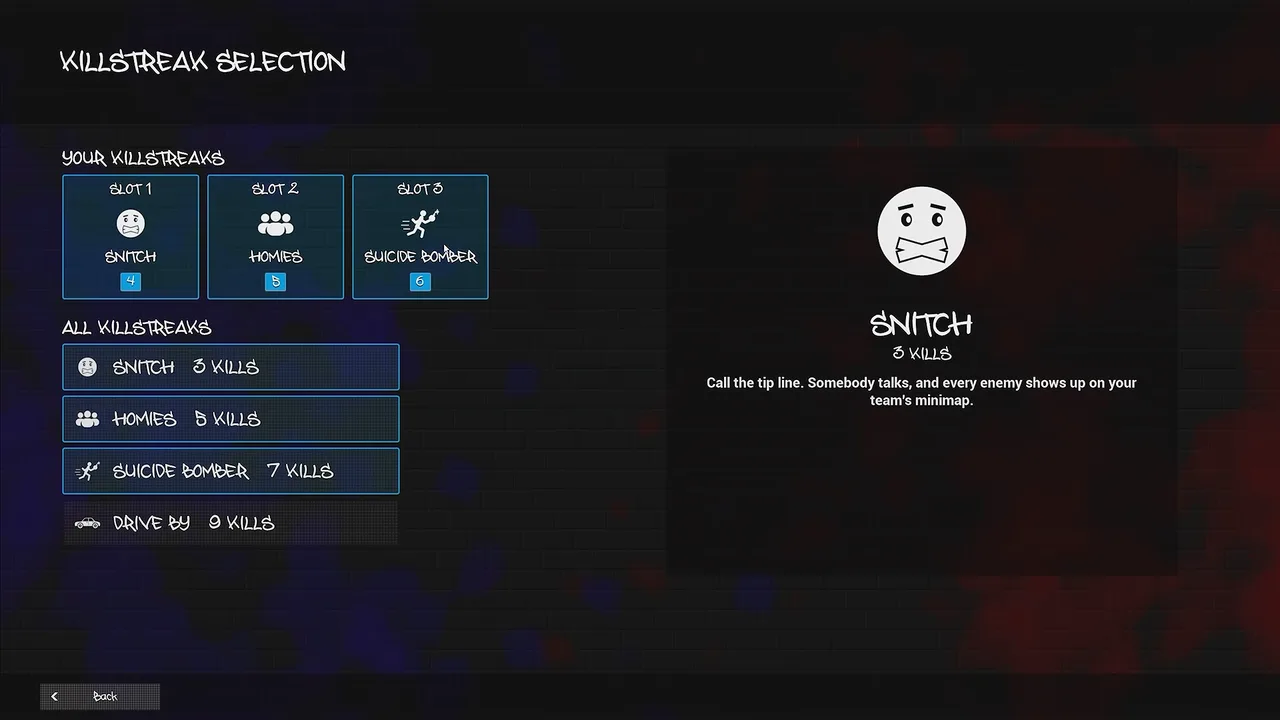
Homies appears in the killstreak selection menu. This is not the screen for configuring practice bots.
The official 1.0.1.8 notes specifically fix Homies clipping through some ceilings and change their Chaos colors to red to match the gang. These are named Homies fixes, not a published change to practice-bot difficulty, count or progression eligibility. Use the killstreak guide for that reward and keep the practice setup checks above separate.
Keep practice separate from progression assumptions
The game has three progression routes: leveling unlocks weapons and equipment, weapon challenges unlock attachments, and kills with a gun unlock its skins. Those systems do not prove that every bot or custom match awards the same progress as an online match.
If unlock progress matters, note the relevant level or counter before the match and check it afterward. You can keep that starting value in the unlock tracker, then update it only from the result your game actually displays. Only treat that session as a working progression method when the game visibly records the progress you wanted. An unchanged counter does not, by itself, identify a bug or establish the rules for all bot matches.
Use bots when you need a repeatable session
Online play with friends and other players is supported alongside bot matches. Bots provide an available alternative for practice, but the setup description does not confirm automatic matchmaking fill, offline operation, maximum bot count or how bots are balanced between sides. Check the options presented in your own match setup rather than looking for a separate Bot Warfare mod from another game.
Give the practice session a purpose
Start with the first-match checklist, choose a job in the mode browser, and check the input checklist. Keep these tasks separate when identifying why an action did not work.
Official feature reference: Hood Warfare 2 on Steam.